# How to start a basic node and express server?
> Node is easy to set up, you can start literally in 5 minutes!
- ### Step 1
Download node on your machine from [here](https://nodejs.org/en/). There is a difference between even and odd-numbered releases. Make sure you check that out!
- ### Step 2
Get npm on your machine from [here](https://npmjs.com/package/npm). NPM is a package manager, to install the dependencies for your project. There are times we need a lot of external packages to run our project. In this case, we need express!
There is another one named [yarn](https://yarnpkg.com/), you can look over that too!
- ### Step 3
Make a new folder named node_server, add a file named app.js in it. This will be your server file. After that run '*npm init' * from your terminal to get started. This will initialize your project, ask you for basic info. You can keep hitting enter for the defaults!
Now you should have a file named package.json created and it should look somewhat like this.
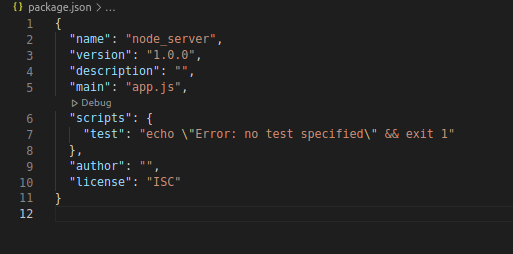
This is the file that maintains and stores a lot of information related to your app! The '*main*' here should be your file name, the default is app.js and we created app.js in the previous step. Remember to change it if you choose another file name.
- ### Step 4
Now we need express, which is a framework to use with node to make the work easier. Node is a runtime environment. To get express, run '*npm install --save express*'
Now you will see a folder for node modules, it contains the dependencies.
- ### Step 5
Make your app.js file like this!
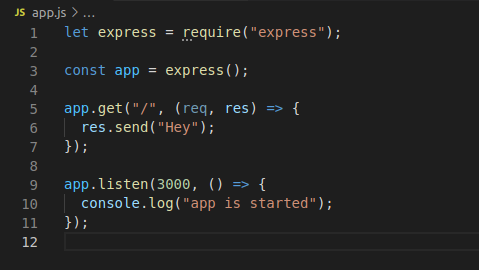
Here we are getting express and configuring it in lines 1-3.
In lines 9-11 -> we are setting up *app.listen *with port 3000. So your server will run on port 3000. It takes a callback.
Lines 5-7 is a sample route. These routes are your endpoints, you can have different ones, i.e. get, post, put, etc.
*What this means here is that, if you send a get request to localhost:3000/, once the server is running it will return "Hey".*
It takes a callback and can have multiple middlewares.
- ### Step 6
In your folder from your terminal run '*node app.js*'. You should have your server running now.
Go to the browser and open localhost:3000.
And this is how you can get your server running in just a few steps. This is how a rest api works, you have endpoints set. And when you send a request to this from your front-end, it performs some logic and returns the response, maybe a login route, user list, menus, items, and so on!
### Thank you so much for reading, I hope you liked it.
If you have any questions or suggestions, please leave a comment below or feel free to reach out.